Pico 2 USB bring-up — opened 2026-10-03#
Received: one Pico 2 with yellow pre-soldered headers and one LSM6DSO IMU. We recorded the user confirmation on October 3. Both parts are untested. This confirmation supersedes the screenshot delivery estimate.
The October 2 Amazon order total is $30.58. The order does not show the item prices, the shipping, the tax or the payment date. Inventory · Order evidence.
First check: USB and the onboard LED#
Place the board on a nonconductive surface. For this board-only check, keep the motor drivers, servos, battery and external GPIO wires disconnected. Use a Micro-USB data cable to connect the board to the computer.
- Hold BOOTSEL while you connect the Pico 2 to USB. Then release BOOTSEL.
- Make sure that a drive named RP2350 appears. Pico 2 uses this name. The first-generation Pico uses RPI-RP2. If no drive appears, try again with a known data cable and USB port.
- Download the official Blink UF2 from the link under Raspberry Pi's C/C++ SDK first binaries. Raspberry Pi documents that this download supports all Pico variants.
- Copy the UF2 to RP2350. Make sure that the board reboots, the drive disappears and the onboard LED blinks.
- Optional: repeat the step with the official Hello World UF2 from the same page. This step is a check of the USB serial output. On macOS, compare the device list before and after connection to identify the new
/dev/cu.usbmodem…device. Record the exact port and the observed output.
The Hux firmware target remains C/C++ with PICO_BOARD=pico2. These vendor examples are checks of the board and the USB path. The Hux firmware is not implemented yet. Software contract.
Check the received IMU#
The received sensor is the SparkFun LSM6DSO Qwiic (manufacturer model SEN-18020). It replaces the earlier Adafruit LSM6DSOX selection. Do a check of the received label and the board revision. Use the LSM6DSO register definitions and initialization. Make the sensor identification a part of the bring-up.
SparkFun specifies 3.3 V operation, SPI and I2C support, and exposed interrupt pins. Power this breakout from Pico 2 3V3(OUT) and GND. Keep its power and logic at 3.3 V. The Qwiic connectors carry I2C. The proposed Hux SPI connection uses the main SPI pads of the breakout and a separate interrupt wire. Before you solder, compare the exact pad/jumper configuration with the received board and the SparkFun schematic.
The source-checked EL-02 wiring sheet adds the physical Pico 2 pin numbers and the component-side pad view. Open the 0x6B/0x6A address jumper before SPI. Leave the SDO address-selection pads unbridged. We also recommend that you open both separate I2C pull-up traces. Keep the SCX/SDIX ground jumpers intact.
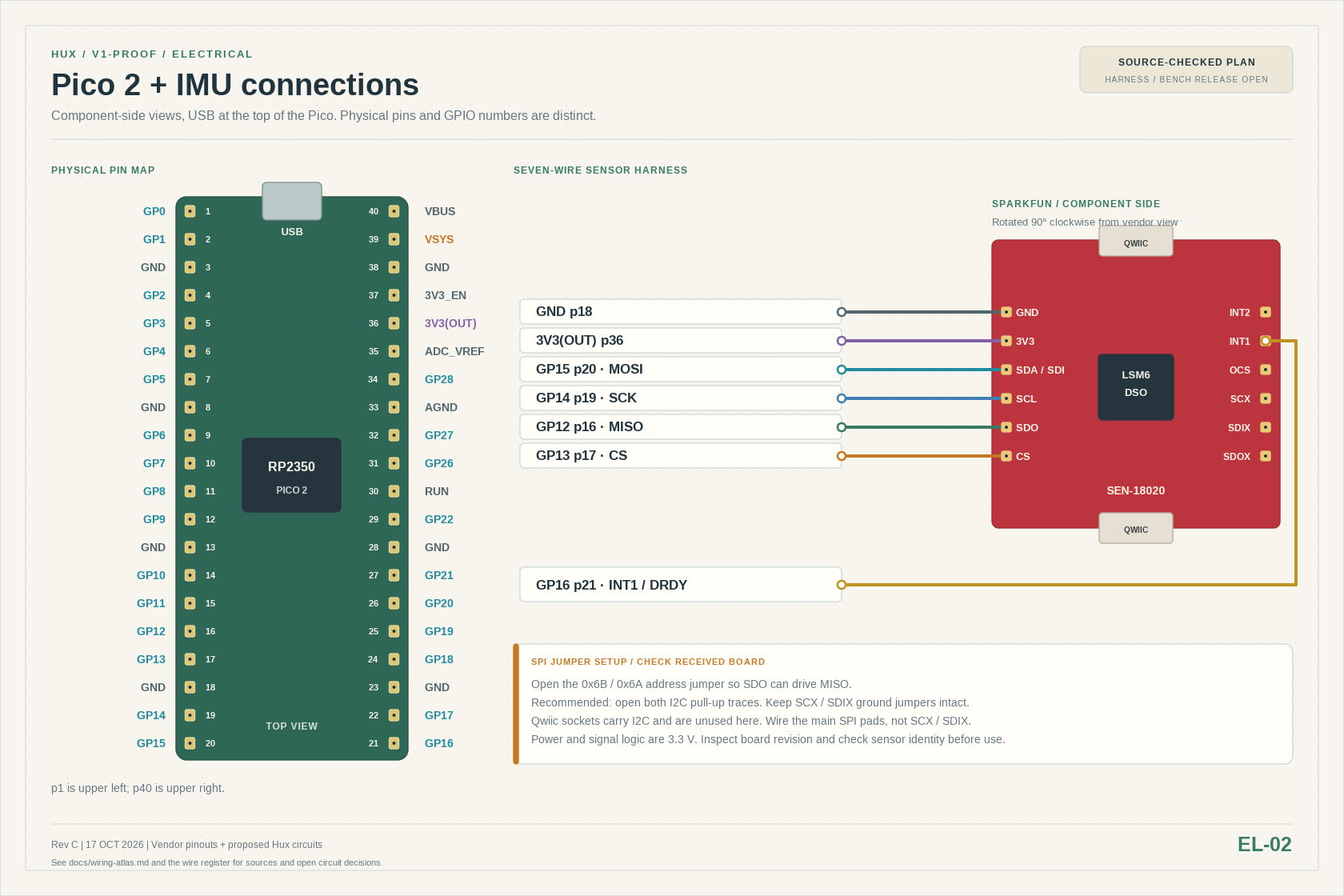
The main MOSI pad is labeled SDA / SDI. The main clock pad is labeled SCL. Inspect the received revision first. SparkFun jumper instructions · Wiring verification record.
| Proposed Pico signal | IMU function |
|---|---|
| GP12 | Main SPI MISO / SDO |
| GP13 | Main SPI chip-select / CS |
| GP14 | Main SPI clock / SCK |
| GP15 | Main SPI MOSI / SDI |
| GP16 | INT1, configured for data-ready |
This table keeps the proposed GPIO allocation. Before balance control, start with the raw sensor readback, the stationary bias log and the axis/sign checks. The ±4 g, ±500°/s, 833 Hz sensor settings and the 500 Hz control loop remain qualification targets. SparkFun specifications · ST LSM6DSO datasheet, hosted by SparkFun.
Session record — results pending#
- Record the board markings, the header condition and any visible damage.
- Record the BOOTSEL drive enumeration: cable/port, host and observed drive name.
- Record the Blink UF2 source and the observed LED behavior.
- Record the optional USB serial port, the UF2 source and the actual output.
- Record the received IMU label, board revision, condition and connection check.
- After the firmware exists, record the IMU identity, raw readings, stationary bias, axis signs and measured timing.
Observed results: none recorded. The delivery opens this checklist. The delivery does not complete a firmware, sensor or powered-motion gate.